WinSpirit mobile casino: browser and PWA access
 Available in US
WinSpirit offers browser-based Progressive Web App (PWA) access on iPhone, Android and desktop devices. The casino can be opened in a browser and, on supported devices, added to the home screen for quicker access. This is different from installing a native app through an app store.
Mobile access changes screen size, navigation and how quickly a user can return to a session, but it does not change a game’s rules or financial risk. The main practical questions are how the browser shortcut behaves, how account information is protected on a shared device and how to keep frequent mobile access from turning into automatic play.
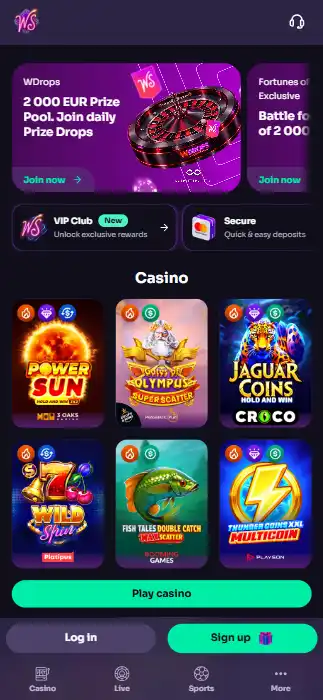
Table of Contents
- WinSpirit runs through a mobile browser and PWA-style access
- Account and games work through the same access context
- Device safety and session boundaries matter on the go
- A browser shortcut is installed through device controls
- Questions about WinSpirit mobile access
- Mobile convenience should not replace deliberate limits
WinSpirit runs through a mobile browser and PWA-style access
The operator presents WinSpirit as a web-based casino with a Progressive Web App option that can be installed to a home screen on supported devices. A PWA is a web experience designed to be opened through the browser’s application-like entry point. It can appear as an icon alongside other apps, although the exact controls and presentation depend on the browser and operating system.
This distinction matters when people search for a WinSpirit “app”. A home-screen entry to a website may feel similar to tapping a native application icon, but the installation route is different. It would be misleading to treat WinSpirit’s web-app description as proof of a specific listing in Apple’s App Store or Google Play.
Three access formats are not interchangeable
| Format | How it is reached | Useful distinction |
|---|---|---|
| Ordinary browser tab | Navigate to the known casino website in a browser | Browser interface and browsing history remain visible in normal browser use |
| Home-screen web shortcut or PWA | Add or install a supported website entry from browser controls | Convenient icon; appearance and capabilities vary by device |
| Native store application | Installed from an operating system’s app distribution service | Requires a separate store listing and installation |
A shortcut and a PWA can look different across devices. One may open in a normal browser window, while another can appear in a more standalone frame. Check the device’s own menus for tabs, storage and permissions instead of assuming that every “app” entry behaves the same way.
WinSpirit’s description includes iOS, Android and desktop access. That makes the service’s browser model relevant beyond a phone: a computer can also have a shortcut or other web-app entry point. It does not imply identical menus or installation controls on every machine, and it says nothing about a particular version of a browser.
- Start from the recognised WinSpirit website rather than a third-party installation link.
- Use browser controls to decide whether a home-screen entry is useful on the device.
- Understand whether the entry opens a regular browser tab or its own window.
- Keep track of how to remove the shortcut when it is no longer wanted.
A web shortcut is a convenience feature, not evidence of enhanced safety, better odds or privileged offers. The content and any gambling terms still need to be judged on their own merits.
Account and games work through the same access context
On a mobile device, the important distinction is between access to the WinSpirit service and the games offered inside it. A browser-based entry point does not in itself make a special mobile-only catalogue or change a game’s return. The operator names slots, live dealer games, crash titles, tables and other game categories as part of its general casino offering.
The WinSpirit casino games guide explains how live tables, slots and crash rounds differ in pace and rules. Those differences are especially noticeable on a smaller display: a short round may take little screen space but still represents a separate financial decision. Being able to tap a spin or table bet quickly does not make it less consequential.
Compact screens require deliberate checks
When interacting with a game, the bet amount, optional features and session balance may be spread across different areas of the screen. Before committing to any wager, identify which number is the actual stake and which is a balance or potential payout. A landscape layout, a collapsed panel or a small action button should not lead to an unintended selection.
Live dealer games add a streaming presentation and timed betting windows. On a phone, a video frame can compete with betting controls for space. Missing a round because the interface is inconvenient is preferable to rushing a wager before a countdown. A stream may also be interrupted if the connection changes or another application takes focus, and the user should not assume that an interrupted screen proves a wager was cancelled.
- Read the game rules before relying on a familiar icon or name.
- Locate the displayed stake and any additional bets before the first action.
- Use a session budget covering all game categories, not a separate budget for each screen.
- Pause after an interruption rather than making extra wagers to compensate for lost time.
Mobile access can make gambling feel like a brief activity that fits between errands, but repeated small wagers still add up. For a simple illustration, 40 stakes of CAD $2 represent CAD $80 in total turnover; 100 such stakes amount to CAD $200. Turnover is not identical to net loss, since results can vary, but counting repeated stakes helps show how quickly the amount risked can grow.
Signing in to a website on a phone also carries routine risks when other people use the same device. Avoid assuming that closing an app-like window ends a login session. Use the service’s sign-out controls when appropriate and protect the device with a screen lock. Those precautions concern access control; they do not represent a claim about WinSpirit’s internal session expiry policy.
Device safety and session boundaries matter on the go
The convenience of a home-screen icon can reduce the number of steps between seeing a device and opening an account. That ease can be useful for everyday web services, but in a gambling setting it can also make returning to play more automatic. A person who has chosen a break may prefer to remove the shortcut or place it away from frequently used applications.
Protecting the device is equally practical. A phone can contain browser history, cached pages, saved passwords and private account messages. A lock-screen code or biometric unlock, along with separate user profiles where supported, helps limit casual access. If another person regularly uses the device, leaving a gambling account signed in may expose more personal information than intended.
- Device lock: keep a screen lock enabled and avoid sharing its unlock method casually.
- Password hygiene: use a unique password for the casino and a different one for the linked email account.
- Message caution: navigate to the known domain instead of entering credentials through unexpected links.
- Session reminder: use a time or budget reminder that operates independently of gambling outcomes.
- Break from play: remove shortcuts and disable relevant notifications where the device permits it.
These measures are not a substitute for account-level protection, but they reduce ordinary exposure on the device itself. The WinSpirit account and verification guide covers secure sign-in details and why records are helpful if an access or payment question later arises.
Changing connectivity can interrupt what you see
Mobile networks can move between wireless and cellular connections, and individual applications may pause in the background. A briefly frozen or reloaded page is a display event; the status of a game round or transaction should be checked in the appropriate account history where such information is shown. Making the same action again immediately can create confusion about what already happened.
Likewise, a disappearing balance figure may reflect navigation or incomplete loading rather than proof of a financial outcome. Treat the account’s transaction and round records as the relevant starting point for a support question. Keep timestamps and visible references if there is an error, but do not send a login password or payment credentials when describing it.
Gambling loss limits are especially important when a device makes sessions available at almost any time. An agreed maximum amount and a stopping point are easier to follow when chosen before opening the site. Time spent monitoring a live game stream or waiting for a result also counts toward the session, even where few bets are made.
A browser shortcut is installed through device controls
On a supported device, adding WinSpirit to the home screen normally starts with the website open in the browser. The menu may show wording such as “Add to Home Screen”, “Install app” or a similar option. The label and location vary by browser and operating system, so there is no single sequence of taps that applies to every device.
Before adding an icon
- Open the recognised WinSpirit domain directly and confirm its address before entering account details.
- Look for the browser’s share, menu or installation control.
- Review the name and website that the proposed shortcut will open.
- Use the device’s home-screen or application controls to remove the entry when it is no longer needed.
The device might show a standalone window or an ordinary browser tab after the shortcut is created. That is a characteristic of the local browser integration and is not, on its own, a casino feature or performance measure. A home-screen icon also does not automatically provide offline access to casino games, independent account credentials or guaranteed availability during poor connectivity.
For Android users, supported browsers can present installation controls in their site menus. For iPhone users, browser share or home-screen actions can supply a shortcut. These are general descriptions of device features, not step-by-step promises for every software version. Desktop browsers may also offer an installation or shortcut option, depending on platform support.
A shortcut can be removed without treating it as proof that the underlying casino account has been closed. Removing an icon changes the device’s access path, not the relationship between the user and an online service. Anyone seeking to close an account or restrict gambling should distinguish a device action from an account request and keep the latter in writing when appropriate.
With mobile access, the best interface is the one whose rules, controls and displayed amounts remain understandable. A faster route to a site is not a reason to increase stakes or extend sessions. It is more important to recognise what an action costs and to finish at the time and amount set beforehand.
Questions about WinSpirit mobile access
Can WinSpirit be used on iPhone and Android?
Yes. WinSpirit offers browser-based Progressive Web App access on iOS and Android, as well as desktop devices.
Is a WinSpirit home-screen icon the same as an App Store download?
No. A PWA or website shortcut is added through browser and device controls; it is not the same as a native App Store or Google Play installation.
Does using WinSpirit on mobile change a game’s odds?
The browser access format is not itself a change to the rules or mathematical outcome of a casino game. Read the rules for the exact title and keep a session limit.
Read next
Mobile convenience should not replace deliberate limits
WinSpirit presents mobile access as a browser-and-PWA experience on iOS, Android and desktop devices. A home-screen shortcut can make the site easier to open, but it does not create a separate native app, a different games catalogue or better gambling outcomes.
Focus on the precise stake, readable controls, protected login details and the point at which a session should end. Mobile browsing makes returning to a casino easy; it is worth making the decision to play a conscious one rather than a reflex caused by a convenient icon.
Published by the Win-spirit-ca.org team.